
LTO Portal Login and Registration Guide 2026
You searched for this because standing in an LTO queue for three hours is not something anyone wants to repeat. Maybe your license renewal is coming up. Maybe you just bought a motorcycle and need to sort out registration. Or maybe you tried logging in to the portal last week and something went wrong. Whatever brought you here, you are in the right place.
This guide walks you through everything about the LTO portal login and registration process in 2026, including how to fix the most common problems people run into.
Managing your motoring records safely and securely starts right here at LTO Trackers.
What Is the LTO LTMS Portal?
The LTMS stands for Land Transportation Management System, and it is an online portal managed by the Land Transportation Office of the Philippines. This portal became active in the year 2020 and has continued to be the first option for all Filipino drivers since then.
This online portal can be accessed through any device, whether it be a smartphone, a tablet, a laptop, or even a computer. The online portal runs on a round-the-clock basis and is available for all seven days in a week. Even overseas nationals of the Philippines, like OFWs, can make use of this online portal.
This becomes the single-point platform for all transactions related to the LTO.
How to Register on the LTO Portal Step by Step
Registration is free and takes around ten minutes if you have everything prepared.
- Open the browser and search for the LTO Portal on your browser
- Click the Register Now button on the homepage

- Read through the Terms of Agreement, tick the acceptance box, enter the captcha code, and click Next

- Select Enroll as an Individual

- Answer whether you hold a Philippine driver’s or conductor’s license
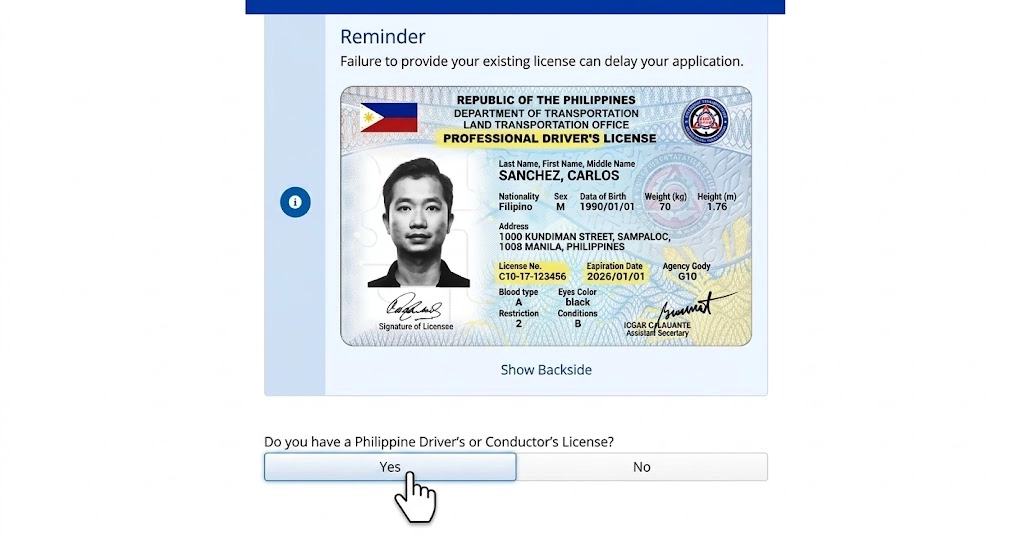
- Confirm your citizenship status

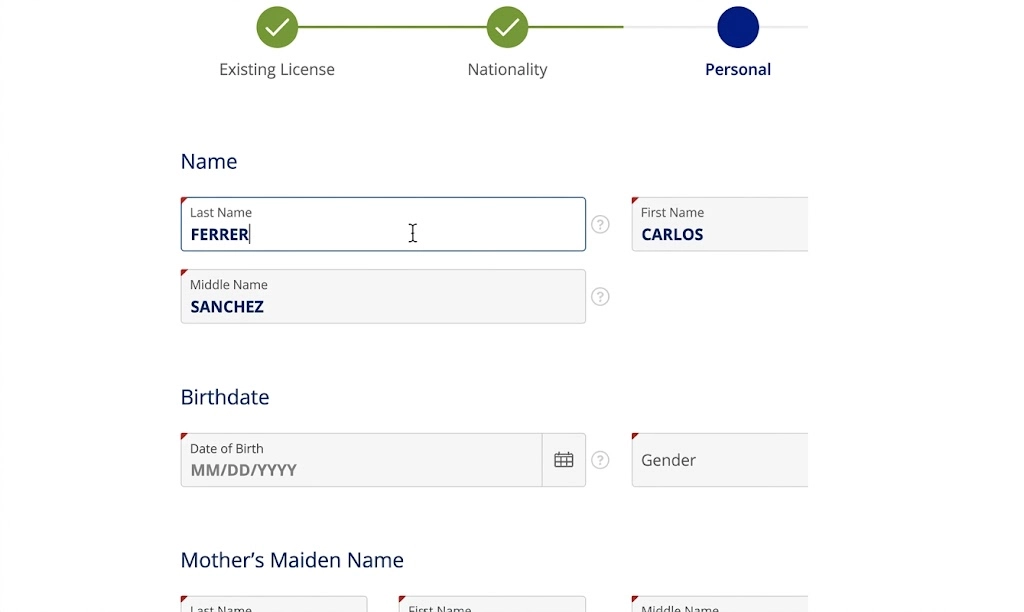
- Fill in all required personal details, including your name, birthdate, email address, and mobile number
- Click Create Account
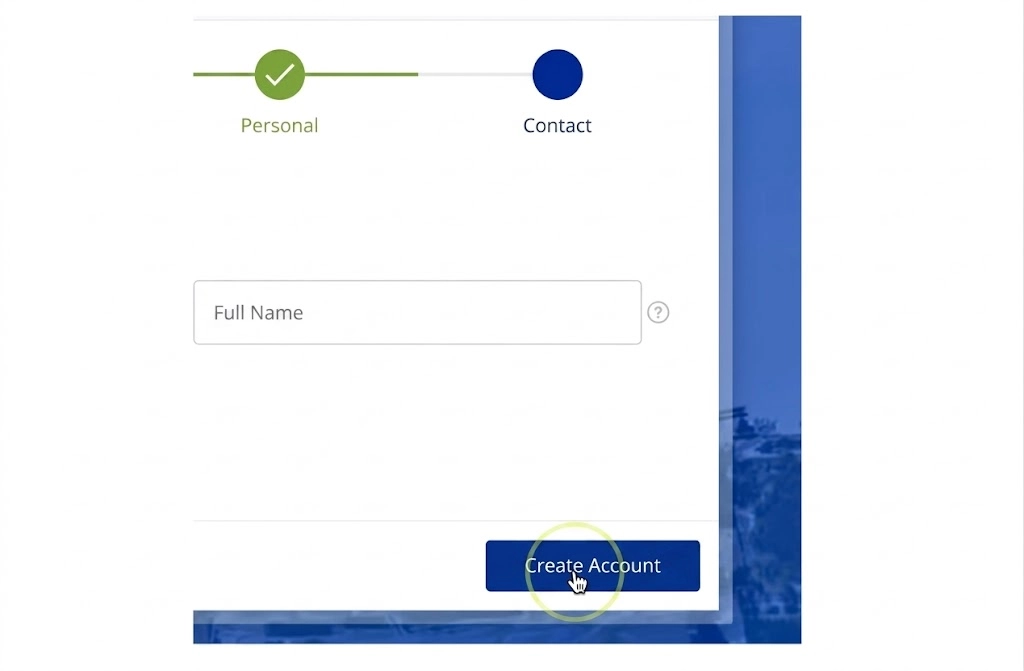
- Open your email inbox and click the verification link sent to you

- Set your password once the link is confirmed

One thing to watch out for: the verification link is only valid for 24 hours. If you miss that window, the account does not get created. You will need to go through the whole process again. So open that email as soon as you finish signing up.
After setting your password, you are in. You now have a working LTMS portal account.
How to Log In to the LTO Portal
Once your account is active, logging in is straightforward.
- Go to the official LTO portal
- Click Login in the upper right corner

- Enter the email address and password you used during registration

- Click Sign In
That is it. After logging in, your dashboard gives you access to all available LTO online services, including license applications, vehicle registration, exam scheduling, violations checking, and more.
If you are using a shared device like a computer at an internet café, always log out after finishing your session. Your LTO account contains personal and vehicle information you do not want exposed.

What You Need Before You Register
Getting these ready before you start saves you from getting stuck halfway through the form.
Technical Requirements
- A device with a working camera and internet connection
- A stable internet connection, not mobile data on a weak signal
- A valid and active email address that you check regularly
- A working Philippine mobile number for OTP verification
Personal Information and Documents
User Type | Required Information |
New Applicants | Full name, birthdate, mother’s maiden name, complete address |
Existing License Holders | License number, expiry date, OR number, or mother’s maiden name |
Motorcycle Owners | Vehicle details, OR/CR, license number if applicable |
Foreign Nationals | Nationality, ACR number, ACR expiry date |
Organizations | TIN, SEC, or DTI registration details |
Make sure everything you enter matches your official ID exactly. Even a small mismatch in your middle name or suffix can block your registration.
Who Can Register on the LTO Portal?
The portal is available for a broad range of individuals who qualify. Individuals eligible to register include:
- Filipino citizens, whether residing within or outside the country
- A foreigner with an Alien Certificate of Registration (ACR)
- First-time applicant who wants to apply for a student permit
- Individuals with an active or expired license
- Motorcycle owners who wish to register or renew their license
- Driving schools, car dealerships, clinics, or other establishments that deal with automobiles
Any person with a motor vehicle or a license has been considered in building the portal. Motorcycle owners specifically can use the LTO portal registration to register their bikes, check violations, and track plate status just like car owners.
How to Reset Your LTMS Portal Password
Forgetting a password happens to everyone. You do not have to panic. Just follow these simple steps to reset your password. Here is how you fix it:
- Go to the login page at the LTO portal
- Click Forgot Password
- Enter the email address linked to your account
- Open your inbox and click the password reset link
- Create a new password and confirm it
- Log in with the new password
If the reset email does not show up in your inbox within a few minutes, check your spam or junk folder. It usually lands there for first-time users. If it is still not there after ten minutes, double-check that you entered the correct email address. If you cannot access your account on your own and want guidance, read our How to retrieve LTO portal account guide.
Tips for Keeping Your LTO Portal Account Secure
Your LTMS account holds your license details, vehicle records, and transaction history. Keeping it secure is worth the extra effort. Securing your account can save you from scams and fraud happening everywhere. Follow these tips for extra protection:
- Use a strong password that mixes letters, numbers, and symbols
- Never share your login credentials with anyone, including family members
- Always log out when using a shared or public device
- Screenshot or save your confirmation receipts after completing any transaction
- Only ever access the portal through the official URL to avoid phishing sites that look identical to the real one
Common LTO Portal Login Problems and How to Fix Them
This is where a lot of people get stuck. The portal is functional, but it has quirks. Here are the most reported login issues and exactly what to do about each one.
Wrong Email or Password Error
This is the most common issue. You enter your information, but the program tells you that it is wrong.
The reason for this would probably be that you signed up using a different email account than what you currently have. People can have more than one email address, and they can sometimes get confused as to which one they used when they initially registered their account.
Account Not Yet Verified
If you signed up but never clicked the verification link in your email, your account does not exist in the system yet. The portal will not recognize your login attempt.
The fix is to register again. There is no way to resend the verification email for an expired link. Just go back to the registration page and start fresh. This time, verify immediately after signing up.
Verification Email Not Received
You registered, but no email arrived.
First, check your spam and junk folders. Most portal emails end up there. If it is not there either, it is possible the email address was entered with a typo during registration. In that case, register again with the correct email and verify right away.
Account Locked After Multiple Failed Login Attempts
Entering the wrong password too many times triggers an automatic account lock. This is a security feature, not a glitch.
Wait for the lockout period to expire and try again. If the lock does not lift after a reasonable amount of time or you cannot remember your password at all, reach out to LTO’s client care email at clientcare@lto.gov.ph. They can assist with account recovery.
OTP Not Being Received
Some transactions on the portal require an OTP sent to your registered mobile number.
If the OTP is not coming through:
- Make sure the number you registered with is still active
- Check your signal strength
- Request the OTP again after waiting a minute
- If your number has changed since registration, you will need to contact LTO support to get it updated, since you cannot change it yourself through the portal
LTO Portal Not Loading or Running Slow
The portal attracts a lot of traffic, particularly during peak hours in the afternoon. If the webpage fails to load or loads very slowly:
- Reload the page and wait for a few seconds
- Delete the browsing cache and cookies on your web browser
- Use a different web browser, such as Chrome or Firefox, which generally perform better than other browsers
- Connect using WiFi rather than mobile internet
- Try again early in the morning when traffic on the portal is lower
How to Take the LTO Portal Exam Online
The LTO portal exam refers to the Comprehensive Driver’s Education Online Validation Exam, or CDE. Drivers who are renewing their licenses need to pass this exam before the renewal is processed.
Here is what you need to know:
- Log in to your LTMS account and navigate to the CDE exam section
- The exam is available 24/7, so you can take it at any time that suits you
- A free e-learning module is available through the portal to help you prepare
- Once you pass, the CDE certificate is automatically saved to your account
- Print or save the certificate and present it when you visit the LTO branch for the physical part of your renewal
The exam tests knowledge of road safety, traffic rules, and driver responsibilities. Going through the e-learning module first is the smartest way to prepare because the questions are aligned with it.
LTO Portal Registration Problems and How to Fix Them
Registration issues are different from login issues. Here is what to do when the sign-up process itself hits a wall.
"Email Already in Use" Error
This means there is an existing account registered using the specified email address. There is no need to create another account. Log in using the “Forgot Password” link from the login page. Creating a second account using the same email address is impossible because only one account can be created per email address.
Personal Details Not Matching the System
If the information provided by you doesn’t match the information stored in the database of LTO, then there will be a clash between your data and the database’s data.
Your information should precisely match your ID, including spellings and date of birth and should be exactly similar to the details written on the driver’s license already issued to you.
Cannot Get Past the Captcha
Captcha errors are usually browser-related.
- Refresh the captcha and try again
- Disable browser extensions, especially ad blockers, as they sometimes interfere
- Switch to a different browser
- If you are on mobile, try switching to desktop mode
Form Not Submitting
If you click Create Account and nothing happens:
- Go back and check that all required fields are filled in
- Make sure your email format is valid, something like name@email.com
- Check that your mobile number has no spaces or special characters
- Clear your browser cache and try resubmitting
All Services You Can Access After Logging In
Once your account is active and you are logged in, here is everything available to you through the LTO online portal:
Service | What You Can Do |
Driver’s License | Apply for a new license or renew an existing one |
Vehicle Registration | Register a new vehicle or renew existing registration |
Student Permit | Apply for a student permit as a first-time driver |
CDE Online Exam | Take and pass the required exam for license renewal |
E-Learning Module | Access study materials for the LTO theoretical exam |
Violations Check | View recorded traffic violations and alarm status linked to your license or vehicle. You can also track your LTO violations and alarms online for a full breakdown |
LTO Tracker | Track the status of your license, plate, or transaction. Use the LTO tracker for real-time updates |
Plate Number Check | Check your plate number in LTO to confirm delivery or production status |
Driver’s License Status | Check your LTO driver’s license status directly from your dashboard |
Plate Delivery Tracking | Monitor where your plate is in the process through the LTO plate delivery service |
Replacement Plate | File and monitor a replacement plate request via LTO replacement plate tracking |
Certified True Copies | Track and request certified true copies from LTO through your account |
Revision of Records | Request corrections to your personal or vehicle records |
Transfer of Ownership | Process vehicle ownership changes |
Benefits of LTO Portal
The portal handles most of the process, but not all of it. This table shows you exactly what you can finish online and what still requires a physical visit.
Task | Online via Portal | Branch Visit Required |
Account registration | Yes | No |
License application (forms and scheduling) | Yes | Yes, for biometrics and exam |
License renewal (forms, CDE exam, payment) | Mostly | Yes, for photo capture |
Vehicle registration renewal | Partly | Yes, for inspection |
CDE exam | Yes | No |
Checking violations | Yes | No |
Plate and license status tracking | Yes | No |
Student permit application | Partly | Yes |
Transfer of ownership | Partly | Yes |
If you are planning a branch visit, knowing Manila’s operating hours ahead of time saves you from making a wasted trip.
Conclusion
The LTO portal is genuinely one of the more useful government digital platforms available right now. It is not perfect, and the occasional slowdown is real, but for the amount of time it saves on license renewals, vehicle registration, and violation checks, it is absolutely worth using. Get your account set up, keep your login details safe, and you will rarely need to queue at a branch again.
Frequently Asked Questions
Is LTO portal registration free?
Yes, creating an LTMS account costs nothing. Registration is completely free.
Can I use the portal if I am living abroad?
Yes. The portal is accessible from anywhere with an internet connection. OFWs use it regularly to manage their Philippine licenses and vehicle records remotely.
Can I pay LTO fees online through the portal?
Some fees can be paid online depending on the transaction. Others still require payment at the branch or through accredited payment channels. Check the specific service you need for payment options.
Why does the portal keep logging me out automatically?
This is a session timeout feature. The portal logs you out after a period of inactivity for security reasons. Just log back in to continue.
Can a foreign national register on the LTO LTMS portal?
Yes, as long as they hold a valid ACR (Alien Certificate of Registration). They will need their ACR number and expiry date during registration.
How do I update my email address or mobile number on the portal?
You cannot change these yourself through the portal settings. Contact LTO client care to request an update to your registered contact details.
What should I do if my account shows wrong personal details?
Use the Revision of Records service available through your LTMS account to request a correction. Make sure you have supporting documents ready when you do.

