
How to Check Your LTO Plate Number in 2026 (Online, SMS, and In-Person)
You bought a vehicle months ago. The dealer said your plate would arrive in six to eight weeks. Now it has been five months, and you still have nothing. You have no idea if your plate is still being processed, lost in transit, or sitting at a branch office waiting for you to collect it.
This is one of the most common frustrations for vehicle owners in the Philippines right now.
Whatever your reason, this guide covers every working method to check your LTO plate number in 2026. You will find step-by-step instructions, status explanations, delivery timelines, and what to do when the system is not cooperating.
Use our LTO tracker tool to run a quick check before you read further.

Method 1: How to Use the LTO Plate Tracker Online
This is the fastest option when the system is up and running. The LTO plate tracker is a free online tool that lets you check your LTO plate number status using either your plate number or your MV File Number.
What Is the MV File Number?
Your MV File Number is a 15-digit code printed on your vehicle’s Certificate of Registration. If a plate number search comes back with no results, this number is your backup. It pulls directly from the LTO database and tends to be more reliable when the plate is still in early processing stages.
Steps to Check Your LTO Plate Number Online
- Open the LTO tracker tool on this page

- Select the Track Plate or Track Application option
- Type in your plate number or MV File Number
- Accept the privacy policy checkbox
- Click Track to see your results

The result loads on the screen within a few seconds. If you get an error or a “Not Found” message, scroll down to the fix section further in this guide.
What the LTO Tracker Shows You
Once your search returns a result, you will see a status message. Each one means something different, and the next section breaks all of them down clearly.

LTO Portal Login and Registration Guide
The LTO online portal allows vehicle owners and drivers to manage certain transactions digitally, including checking LTO driver’s license status, registration renewals, and application tracking.
To register for an account:
- Visit the official LTO online portal
- Click on Register or Create Account
- Fill in your personal details and contact information
- Provide your driver’s license number for verification
- Set your password and complete the registration
If you want a detailed guide, visit our page on the LTO portal login and registration. Once logged in, you can access your vehicle and license records, track applications, and in some regions, initiate certain renewal processes online. The portal is separate from the plate tracker tool and requires an account to access full record details.
If you already have an account and cannot log in, try resetting your password through the email verification option on the login page. To get the most accurate, real-time data directly from the government, make sure your LTO portal login and registration is active.
Red Flags to Watch When Verifying a Secondhand Vehicle
If you are using LTO plate number verification as part of a vehicle purchase, there are specific warning signs that should make you stop before proceeding.
Twin plates
This is a scheme where a stolen or smuggled vehicle gets plates copied from a legitimate registration. If the vehicle details returned by the SMS check do not match the physical vehicle in front of you, walk away immediately.
Encumbered status
If the LTO records show the vehicle as encumbered, it is still under a financing agreement or chattel mortgage. The seller does not have the legal right to transfer ownership yet. This is a serious red flag, and you should not sign anything until it is fully resolved.
LTO alarm flag
A vehicle showing an active alarm in the system is flagged by the LTO or the PNP for reasons that include theft, involvement in a crime, or an active investigation. Never buy a vehicle with an alarm status, no matter how good the deal looks.
Also, confirm that the plate number on the vehicle physically matches what is printed on the Certificate of Registration. Any mismatch is a problem. Sometimes the government system glitches; if you run into an error, read our troubleshooting guide on how to fix “Not Found” LTO plate status.
How to Check LTO Violations and Alarms by Plate Number
Every vehicle owner should know their plate’s alarm and violation status, not just buyers. Outstanding violations need to be cleared before you can renew your registration and before any ownership transfer can go through.
The LTO alarm status shows up in the SMS verification reply. If the message includes an alarm flag, it means the vehicle is listed in the LTO or PNP database for a specific reason. You will need to visit an LTO office directly to find out what triggered it and how to resolve it.
For traffic violations, the LTO IT system holds records of violations filed at the national level. However, some violations recorded by Local Government Units through their own enforcement programs may not immediately appear in the national database. To be thorough, check both the LTO system and the LGU where the vehicle is primarily used.
Use our How to Track Your LTO Violations and Alarms Online page for a step-by-step guide on running a complete check.
LTO Plate Tracker Not Working: How to Fix It
The LTO tracker portal has had serious reliability issues in 2026. If you visit the site and get an error message, or if it keeps timing out, you are not alone. Thousands of users are in the same situation.
Here is what you can actually do right now:
- Use the SMS method. Text LTO VEHICLE [plate number] to 2600. This works independently of the web portal.
- Try again at off-peak hours. Early mornings on weekdays tend to have lower portal traffic.
- Visit your LTO branch directly. Bring your OR, CR, and a valid ID. The branch officer can pull your plate status from their internal system.
- Call the LTO hotline. The LTO has a customer service line you can reach during office hours for inquiries.
If none of these give you a clear answer, document your concern in writing and submit it to your LTO branch for follow-up. This creates a paper trail and puts your concern on record.
Method 2: How to Check Your LTO Plate Number via SMS
When the online tracker is down, the SMS method still works. This is a government-provided service, and it does not depend on the tracker portal being operational.
Here is how it works:
- Open your phone’s messaging app
- Type: LTO VEHICLE [your plate number]
- Send it to 2600
- Wait for the reply, usually within a few minutes
The reply will include the vehicle’s make and model, year of last registration, color, current alarm status, and whether the Certificate of Registration is still valid.
What it will not tell you is the owner’s name. That is protected under the Data Privacy Act of 2012, and the LTO will not release it through this channel.
The SMS method works for a quick status check, especially if you are at a car viewing and want to run a fast LTO plate number check on the spot before making any decisions. If your digital status shows that a physical plate is pending, use our LTO replacement plate tracking guide to find out when it will be printed.
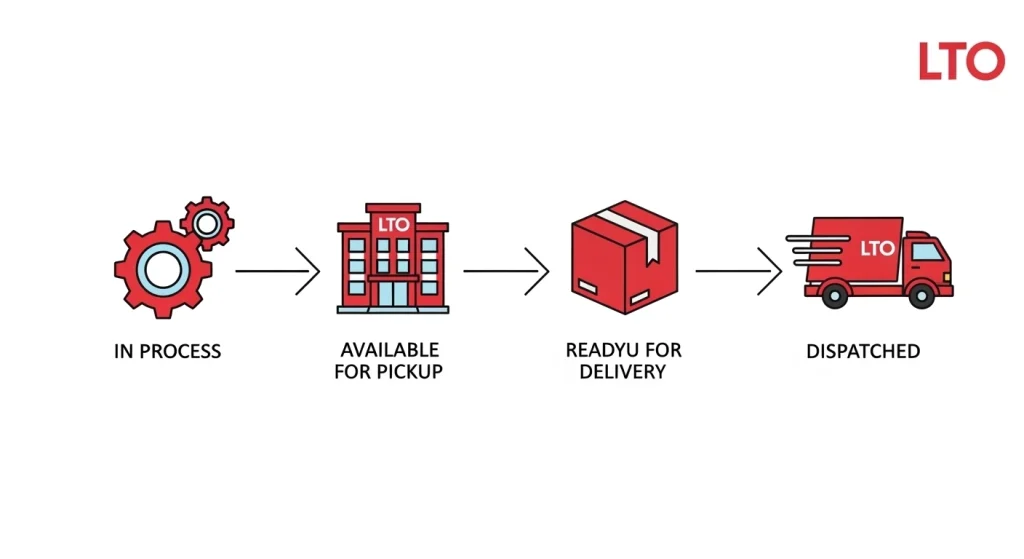
LTO Plate Number Status Meanings Explained
A lot of people see their status and have no idea what it actually means for their next step. Here is a plain-language breakdown of each one.
In Process or Under Process
Your application is still being worked on. The plate has not been manufactured yet or is somewhere in the production pipeline. No action needed from your side at this stage. Just wait and check again in a few weeks.
Available for Pickup
This is the one you are hoping to see. It means your plate is ready and has been sent to the LTO branch you selected during registration. Head to that specific branch with your valid government-issued ID and your vehicle’s Certificate of Registration. Do not go to a different branch because the plate will not be there.
Ready for Delivery
Your plate is packaged and has been handed to the LTO’s courier partner, but has not left their facility yet. If you opted for delivery, expect a shipping confirmation soon. If you have not completed the delivery requirements yet, check your registered email for instructions.
Dispatched or Shipped
The plate is on its way. Delivery time varies depending on where you live. Check the timeline table in the next section for estimated arrival windows. You should also receive a courier tracking number via email or SMS once the plate is dispatched.
What You Can Actually Check with an LTO Plate Number
The online tracker and SMS service do not show you the registered owner’s full name. Philippine privacy law prevents that. What you can confirm includes:
- Current plate status (in process, ready, dispatched)
- Vehicle make, model, year, and color
- Whether the Certificate of Registration is valid
- Any LTO alarm flags on the vehicle
- Registration history and last renewal year
To get the registered owner’s name, you need to go through a formal verification process at an LTO office.
LTO Plate Number Check Shows Not Found: What to Do
This happens more than it should. You type in your plate number, and the tracker just tells you it cannot find anything. Do not panic. There are a few reasons this happens, and most of them have a straightforward fix.
Wrong plate number entered
Double-check the number on your OR or CR. It is easy to misread a zero as the letter O or confuse a number 1 with the letter I.
The application is too new
If you registered or applied recently, your plate may not have been entered into the system yet. Give it two to three weeks and try again.
The MV File Number is more reliable here
If your plate number keeps returning no results, but the application is a few months old, switch to your 15-digit MV File Number. This often pulls results when the plate number search does not.
The tracker itself is down
As of early 2026, the LTO tracker portal has been experiencing extended downtime. Many users across the country are reporting the same issue. In this case, try the SMS method instead or visit your LTO branch directly.
How to Check the Registered Owner of an LTO Plate Number
This is where things get more formal. You cannot just look up who owns a vehicle through the tracker or SMS service. Philippine privacy law is very clear on this, and the LTO follows it strictly.
If you have a legitimate reason to find out who owns a vehicle, such as a road accident, a pending legal case, an insurance claim, or a vehicle purchase verification, you can submit a formal request at any LTO District Office.
What You Need to Bring
Document | Purpose |
Valid Government-Issued ID | To verify your identity as the requester |
Written Request or Affidavit | Explains why you need the information |
Proof of Legitimate Interest | Supporting docs (e.g., incident report, insurance letter) |
Certification Fee (varies) | Required for the release of certified records |
The LTO will review your request. If your reason is considered valid, they will issue certified true copy records that include the registered owner’s name and relevant vehicle details.
For anyone buying a secondhand vehicle, this process is worth going through if you want complete peace of mind. You can also use our track and request certified true copies from the LTO guide to understand the process in more detail before heading to the office.

How to Track Your LTO New Plate Number
If you recently registered a brand new vehicle or applied for a replacement plate, the process works the same way as above. Use your plate number if you already have it, or your MV File Number if the plate has not been assigned yet.
New plate applications and LTO replacement plate tracking follow the same status pipeline: In Process, Available for Pickup, Ready for Delivery, and Dispatched.
For delivery, you will need to submit your documents and pay a shipping fee ranging from around PHP 150 to PHP 600, depending on your region. Once payment is confirmed, LTO passes your details to their courier partner, and you should receive a tracking number by SMS or email.
Expected LTO Plate Delivery Timelines by Location
Location | Expected Delivery Time |
Manila City | Less than 4 working days |
Other NCR Cities | 4 to 10 working days |
Cities Outside NCR | 10 to 21 working days |
Remote Locations | Up to 28 working days |
These are estimates. Actual delivery can be faster or slower depending on the courier’s workload and your exact address.
Frequently Asked Questions
Can I check my LTO plate number status for free?
Yes. Both the online tracker tool and the SMS service (text to 2600) are free to use. The SMS charge depends on your mobile carrier’s standard messaging rates, but the service itself carries no LTO fee.
What is the MV File Number, and where do I find it?
The MV File Number is a 15-digit number assigned to your vehicle by the LTO. You will find it printed on your Certificate of Registration. Use it when a plate number search returns no results.
Can I find out who owns a vehicle using just the plate number?
Not through the public tracker or SMS service. Privacy law prohibits this. You need to file a formal request at an LTO District Office with a valid reason and supporting documents.
How long does LTO plate delivery take?
Delivery time ranges from under 4 working days in Manila to up to 28 working days for remote locations. Check the delivery timeline table in the tracking section above for a full breakdown.
What does Available for Pickup mean on the LTO Tracker?
It means your plate is ready and waiting at the LTO branch you selected when you registered. Bring your government-issued ID and Certificate of Registration to collect it.
How do I check if a vehicle has an LTO alarm?
Send an SMS to 2600 using the format LTO VEHICLE [plate number]. The reply will include the vehicle’s alarm status. An active alarm means the vehicle is flagged and should not be purchased or transferred.
What documents do I need when picking up my plate at an LTO branch?
Bring your original, valid government-issued ID and your vehicle’s Certificate of Registration. The staff at the plates section will verify your documents before releasing the plate.
What does an encumbered status mean on LTO records?
It means the vehicle is still under a financing agreement or chattel mortgage. The current registered owner cannot legally transfer ownership until the encumbrance is lifted by the lender.

